
Working with checks
Every Uptime check runs on a schedule and confirms a failure before it alerts, so a single slow response doesn’t page anyone.
How a check goes down
Section titled “How a check goes down”When a check fails, it waits for its confirmation period and checks once more. A failure during the confirmation period opens no incident and sends no alert. If the re-check fails too, the check goes Down, opens one incident, and alerts once. When it recovers, it sends a recovery alert, but only after it was Down.
Heartbeats work differently: their grace period is the confirmation.
Settings
Section titled “Settings”These are under Advanced settings in the Add check dialog and in each check’s settings. When you save a check’s settings, only the fields you changed are saved.
| Setting | Default | Options |
|---|---|---|
| Check frequency | 3 minutes | 20 s, 30 s, 1, 2, 3, 5, 10, 15, or 30 minutes. |
| Confirmation period | 2 minutes | Immediately, 30 s, 1, 2, 3, or 5 minutes. |
| Request timeout | 30 seconds | 5, 10, 15, 30, 45, or 60 seconds. For ping checks the field is Ping timeout: 5 or 10 seconds, default 10. DNS checks also allow 5 or 10 seconds. |
| Follow redirects | On | Follows up to 10 redirects. Off: a redirect response counts as the response. |
| Internet Protocol (IP) version | Both IPv4 and IPv6 | IPv4 only or IPv6 only. Website, keyword, ping, and TCP port checks. See IP version. |
| SSL/TLS verification | On | Treats an invalid, expired, or self-signed certificate as down. |
| SSL expiration | Alert 14 days before (https URLs) |
Don’t check for SSL expiration, or alert 1, 2, 3, 7, or 14 days, or 1 or 2 months before. See below. |
| Domain expiration | Don’t check for domain expiration | Alert 1, 2, 3, 7, or 14 days, or 1 or 2 months before. See below. |
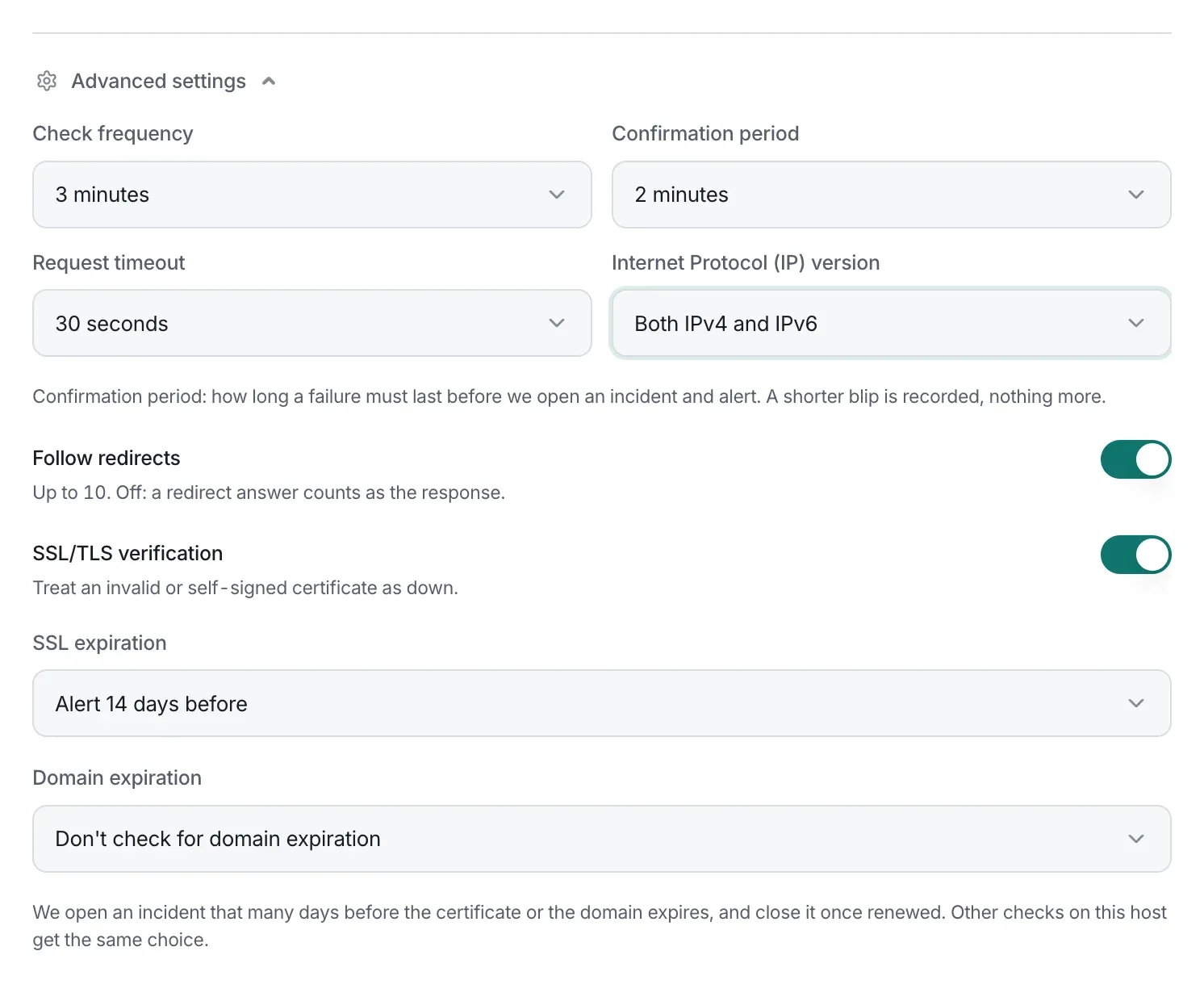
Website and keyword checks also have request settings and SSL and domain expiration, and TCP port checks have a TLS option.
IP version
Section titled “IP version”Internet Protocol (IP) version sets how website, keyword, ping, and TCP port checks connect. It’s Both IPv4 and IPv6 by default. With IPv4 only or IPv6 only, the check connects only over that family, from every location it runs from.
If the host has no address of the chosen family, or you entered an IP address of the other kind, the check is down with, for example, “ipv4.google.com has no IPv6 address”. DNS checks don’t have this setting: the DNS server’s address decides.
SSL and domain expiration
Section titled “SSL and domain expiration”Website and keyword checks can watch their site’s SSL certificate and its domain registration. Choose how early to be told with SSL expiration and Domain expiration. Both lists have the same choices.
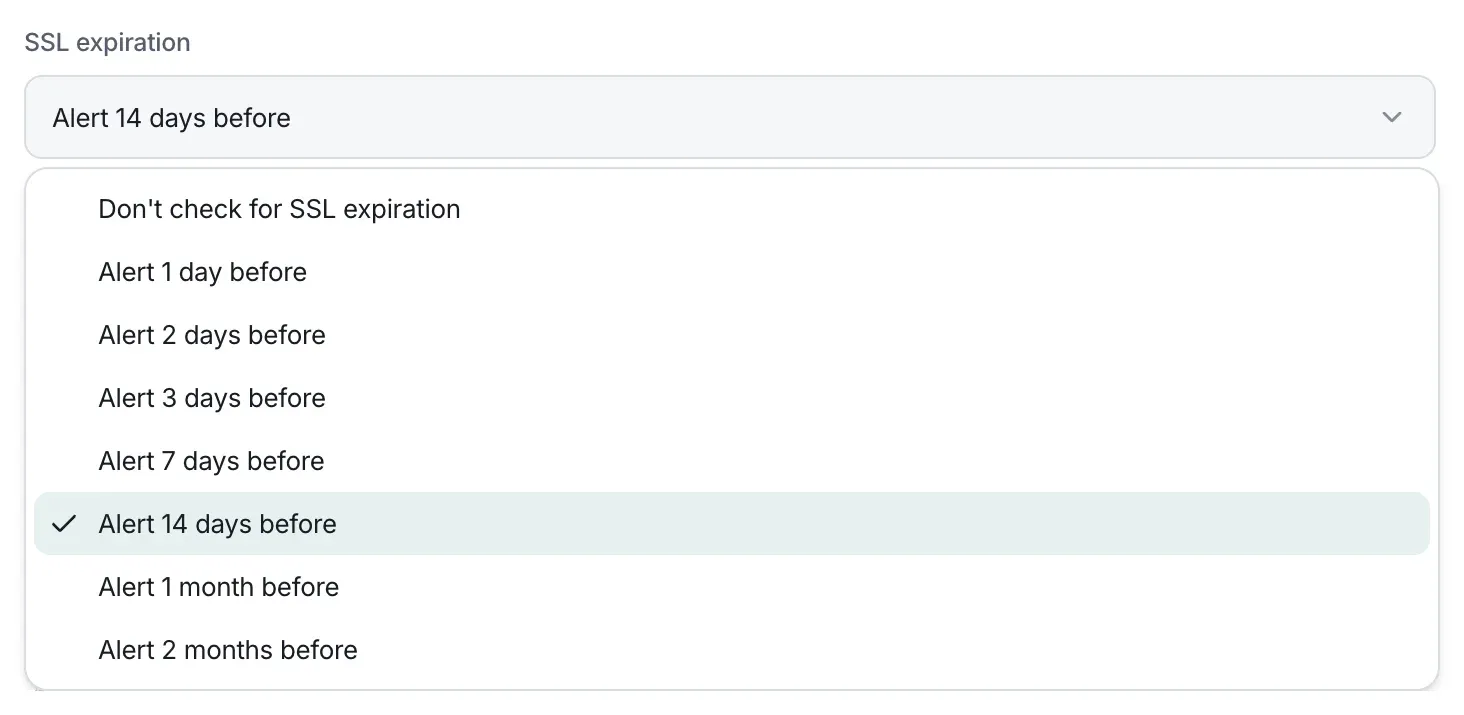
- Once the certificate or the domain is within that many days of expiring, the check opens an expiry incident and alerts its alert channels.
- The incident closes by itself once the certificate or domain is renewed, with an alert saying “…was renewed: it now expires on” and the new date. It can’t be resolved by hand.
- Expiry dates are checked every hour, and a few seconds after you save a check. A domain’s date comes from its registry (RDAP), which TunnelHQ asks at most once a day. When the registry gave no date, because of an error or because it doesn’t publish one, TunnelHQ asks again after 6 hours.
- SSL expiration needs an
https://address, and is greyed out for anhttp://one. If a check’s address changes tohttp://, it stops watching the certificate, and any open certificate incident closes. It watches the site’s own certificate, the one your visitors’ browsers are shown, and doesn’t depend on SSL/TLS verification. - New checks start with SSL expiration at 14 days and domain expiration off.
- The choice is shared: changing either one in a check’s settings applies it to the project’s other website and keyword checks on the same host. Adding a check doesn’t change the others.
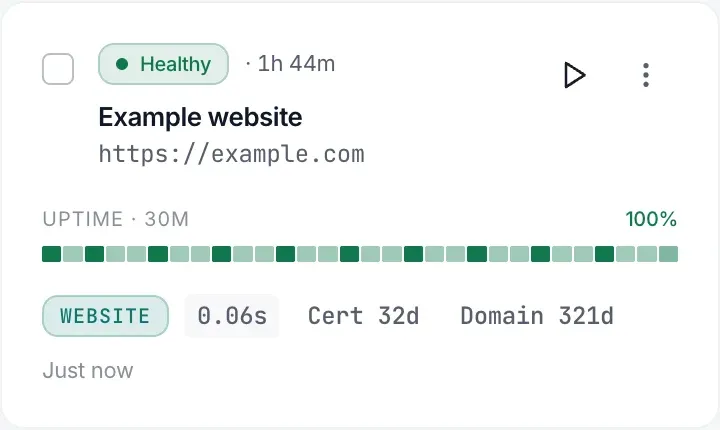
A few seconds after you save a check, its card and its settings under Domain expiration show the date when it’s known, such as “example.com expires on 13 August 2027, in 321 days”. Some registries don’t publish expiry dates, for example for .de, .io, and .pk domains. The settings then say so, such as “The registry for .de doesn’t publish expiry dates”, and domain expiration never alerts for that domain.

TCP port checks with TLS keep their own reminders, at 21, 14, and 7 days, without an incident.
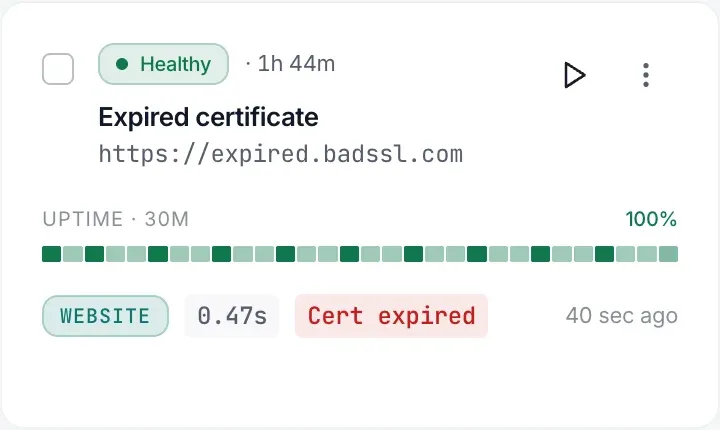
Check cards show the days left, such as Cert 60d and Domain 45d. Each turns amber within the check’s chosen window, or within 14 days if that’s longer: with Alert 7 days before, from 14 days; with Alert 2 months before, from 60 days. An expired certificate reads Cert expired, and one that isn’t trusted for another reason, such as a self-signed certificate, reads Cert invalid.
With SSL/TLS verification off, a check stays up while its certificate is expired, and its card still says Cert expired:
The alerts say what expires, when, and what happens if it lapses, for example:
- “The domain example.com expires in 13 days, on 9 October 2026. Renew it with its registrar before then: Website stops working if it lapses.”
- “The SSL certificate of www.example.com expires in 5 days, on 1 October 2026. Renew it before then: once it expires, browsers and apps refuse to connect to Website.”
Expiry incidents
Section titled “Expiry incidents”An expiry incident shows as Expiring, in amber, never as Down. It reads, for example, “Domain example.com expires on 9 October 2026” or “SSL certificate of www.example.com expires on 1 October 2026”, and its detail panel says “Closes by itself once the certificate or the domain is renewed”.

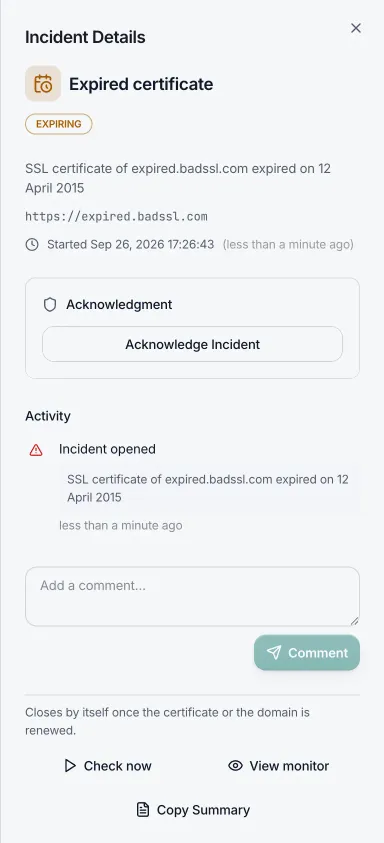
Expiry incidents sort after outages, and don’t count in outage figures such as active outages and response times.
Who gets alerted
Section titled “Who gets alerted”- In Add check, every alert channel in the project is selected to start with.
- At least one must stay selected when you add a check. Otherwise you’ll see “Pick at least one. To alert nobody, change it on the check once it is added.”
- On a check’s Settings tab, you can clear every channel. The check then alerts nobody.
Public addresses only
Section titled “Public addresses only”Checks connect from TunnelHQ’s servers, so private and reserved addresses, such as 10.x.x.x, 192.168.x.x, 127.0.0.1, and 169.254.169.254, are refused when you save:
- “URL is not allowed (must be a public hostname)”
- “Host is not allowed (it must be a public address)”
Host "x" could not be found. Check the address.for a host that doesn’t resolve
Checking from several locations
Section titled “Checking from several locations”When there’s more than one place to check from, Check from is the last field in Advanced settings. The main location is always included.
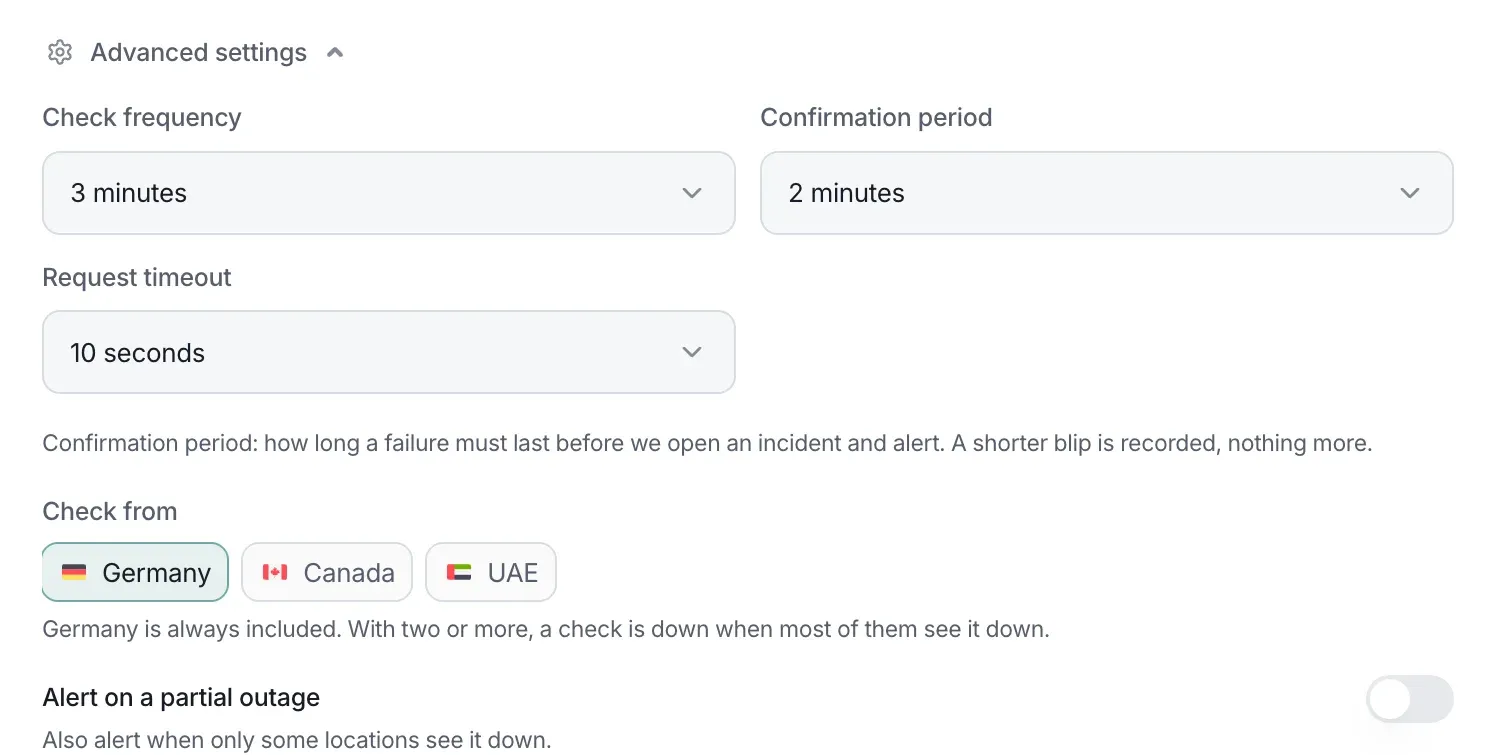
- With two or more locations, a check is Down only when most of the locations still checking see it down: both of 2, 2 of 3, or 3 of 4. Fewer is Partial. This differs from tunnels, where a monitor is Down only when no location is up.
- A location with no working checker is left out.
- Alert on a partial outage also alerts when only some locations see the check down. It’s off by default, and can only be turned on with two or more locations.
On a check’s page
Section titled “On a check’s page”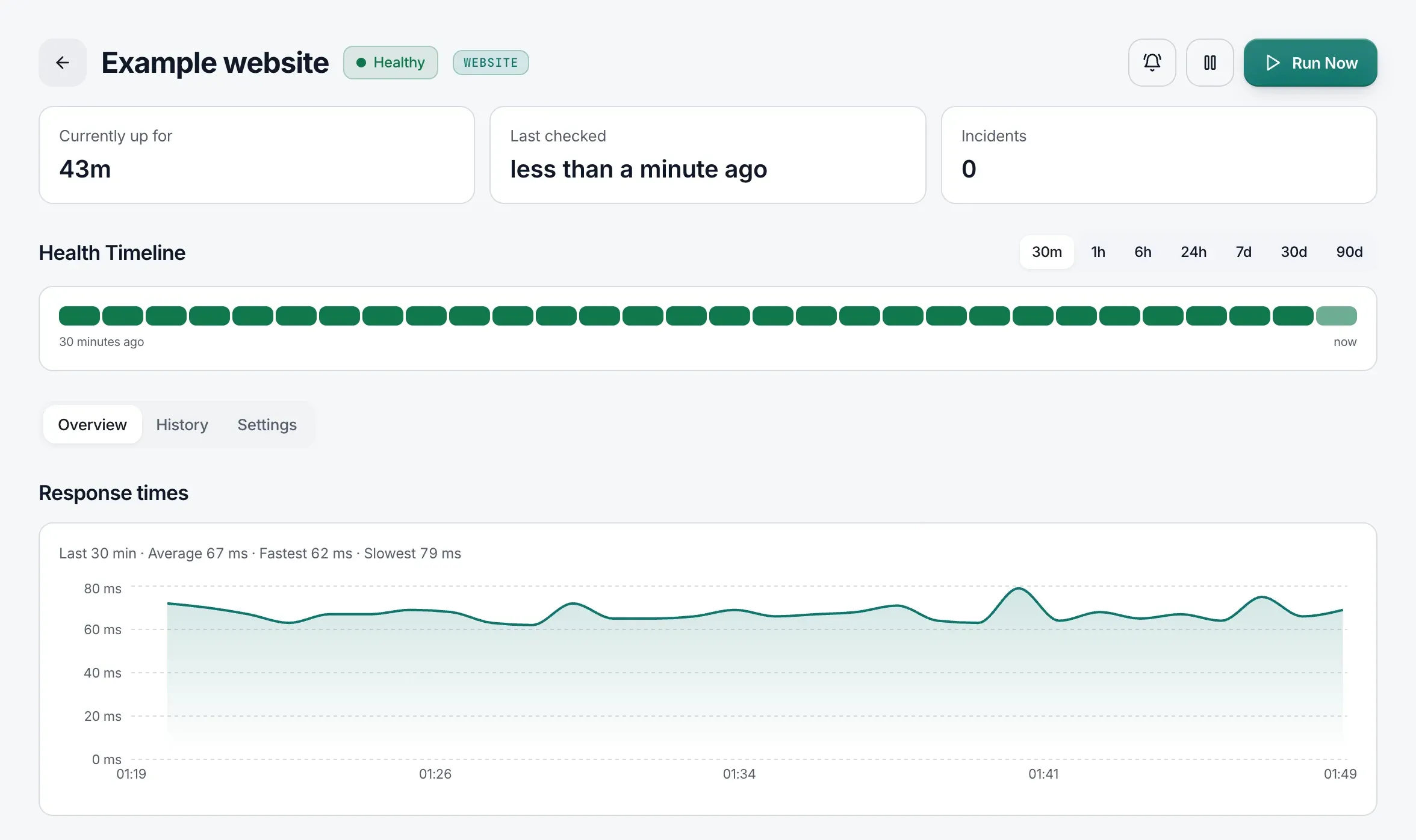
- Run Now, at the top right, runs the check immediately (so does the ▷ button on its card in the Uptime list). It doesn’t use the on-demand test quota that tunnel tests use. Heartbeats have no run button: they’re checked when your job calls their address.
- Send test alert sends a test through every channel the check alerts. It needs a role that can edit monitors.
- A response-time chart, and an availability table for the last 24 hours, 7 days, 30 days, and 90 days: availability, downtime, number of incidents, and the longest and average incident. See Availability.
- Currently up for and Last checked.
- For checks that use TLS, the number of days until the certificate expires is also shown on the check’s card.
Availability
Section titled “Availability”The availability table on a check’s page counts outages. A period’s availability is the share of it with no incident, counted from when the check was created if that’s later, so it always agrees with the downtime beside it. For example, 1 hour down in the last 24 hours reads 95.83%.
- A failure that ends within the confirmation period never becomes an incident, so it isn’t downtime.
- Until a check has its first result, the table shows no figure.
The bars in the health timeline and the uptime figure on a check’s card are worked out differently: checks count their results, and heartbeats measure time. For a check that was down a lot, the card’s figure and the table can differ slightly, because they cover slightly different windows.
Uptime checks in the API
Section titled “Uptime checks in the API”In the REST API, GET /api/v1/servers?family=uptime lists Uptime checks (family=all lists tunnels and checks together; the default is tunnels only), and POST /api/v1/servers creates website, keyword, ping, TCP port, and DNS checks, and heartbeats. Groups are managed in the dashboard only: "type": "group" is refused with 400 “Groups are created in the dashboard for now.”
When you create a check, you can also send:
| Field | Values | Checks |
|---|---|---|
ssl_expiration |
Days before the certificate expires to alert: 1, 2, 3, 7, 14, 30, or 60. 0 or null turns it off. Needs an https:// URL. |
Website, keyword |
domain_expiration |
Days before the domain expires to alert, with the same values. 0 or null turns it off. |
Website, keyword |
ip_version |
"ipv4", "ipv6", or null for both. |
Website, keyword, ping, TCP port |
30 and 60 match Alert 1 month before and Alert 2 months before. A field you leave out takes the value of the project’s other checks on the same host, or, for the host’s first check, the default: 14 days for an https:// URL, and domain expiration off. Check rows return the same three fields, where null means off, or both IP versions.
A DNS check is created with "type": "dns" and these fields:
| Field | Details |
|---|---|
host |
The DNS server to monitor: a public IP address, such as 1.1.1.1, or an IPv6 address with or without brackets. A private or reserved address, or a name, is refused with 400 “host must be the DNS server’s public IP address, like 1.1.1.1.” |
domain |
The domain to ask it about, such as example.com. Labels may start with _, as in _dmarc.example.com. Anything else is refused with 400 “domain must be a domain name to query, like example.com.” |
keyword |
Optional. Text the answer must contain, usually the address the domain should point to. Up to 255 characters. |
DNS checks refuse ip_version, because the DNS server’s address decides it, and ssl_expiration and domain_expiration. Queries always go to port 53. Every check row has a domain field: the domain a DNS check asks about, or null for other checks. A DNS check’s host is its DNS server.
PUT /api/v1/servers/:id updates a website, keyword, ping, TCP port, or DNS check (heartbeats have their own fields). Send only the fields you want to change; the rest stay as they are.
| Fields | Checks |
|---|---|
name, interval, timeout, maxretries, tags |
All |
ip_version |
Website, keyword, ping, TCP port |
url, accepted_statuscodes, ssl_expiration, domain_expiration |
Website, keyword |
keyword |
Keyword, DNS |
invert_keyword |
Keyword |
host |
Ping, TCP port, DNS |
port |
TCP port |
domain |
DNS |
intervalhas the same minimum as when you create the check, and the expiration and IP version fields take the same values.- Changing either expiration setting applies it to the project’s other website and keyword checks on the same host, as in the dashboard.
- When you create or change a check, a field its type doesn’t have is refused with
400and a message naming it, such as “port is for port checks.” or “keyword is for keyword and DNS checks.” - For a DNS check,
keywordset to""ornullclears it. - A check’s type can’t be changed: the API answers “Create a new check instead”.
activepauses (false) or resumes (true) the check, as the dashboard’s Pause and Resume buttons do: its history shows “Monitoring paused” or “Monitoring resumed”, and themonitor.pausedandmonitor.resumedwebhooks fire. It needs permission to pause monitors as well as to edit them, and a resume can be refused with403by the plan. Any value other thantrueorfalseis refused with400“active must be true or false.” It can go in the same request as other changes, such as{"active": true, "interval": 300}.- A running check picks up a change at once. A paused check stays paused unless the request also sends
"active": true.
POST /api/v1/incidents/:id/retest retests any check behind an incident, including a DNS check. The MCP server and the CLI manage Uptime checks from version 0.4.0.