Your VPN credentials, kept safe
Configs and keys are encrypted before they're saved, and only people who can edit tunnels can open them.
Your credentials

Paste a config
TunnelHQ reads it and encrypts the keys with AES-256-GCM before they reach the database.
Viewers never see them
Only people who can edit tunnels can open them; a Viewer sees that they're set.
- SetupPreparing the connection test
- Connect
2.84sauth_failed - Verifynot attempted
Never copied into check history
Each check keeps its stages and the reason it failed, not your keys.
Your account and keys
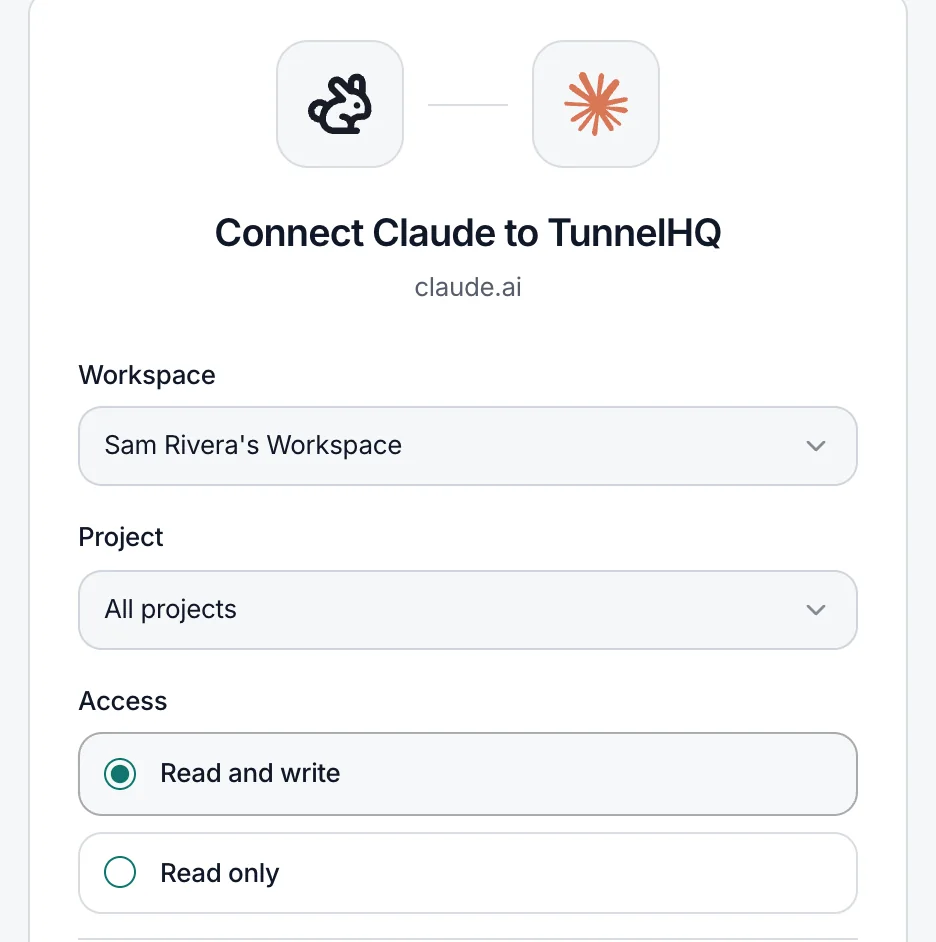
AI connections you scope
One project or all, read only or read and write, revoked whenever you like.
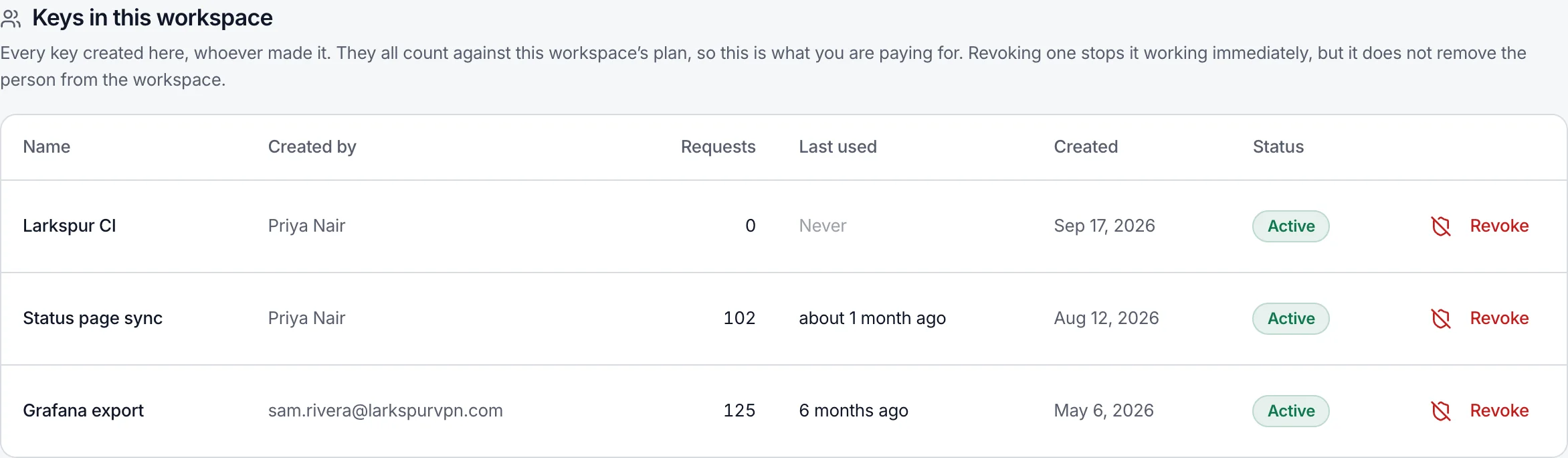
API keys you can see and revoke
Every key in the workspace, who made it and when it was last used. Revoking one stops it at once.
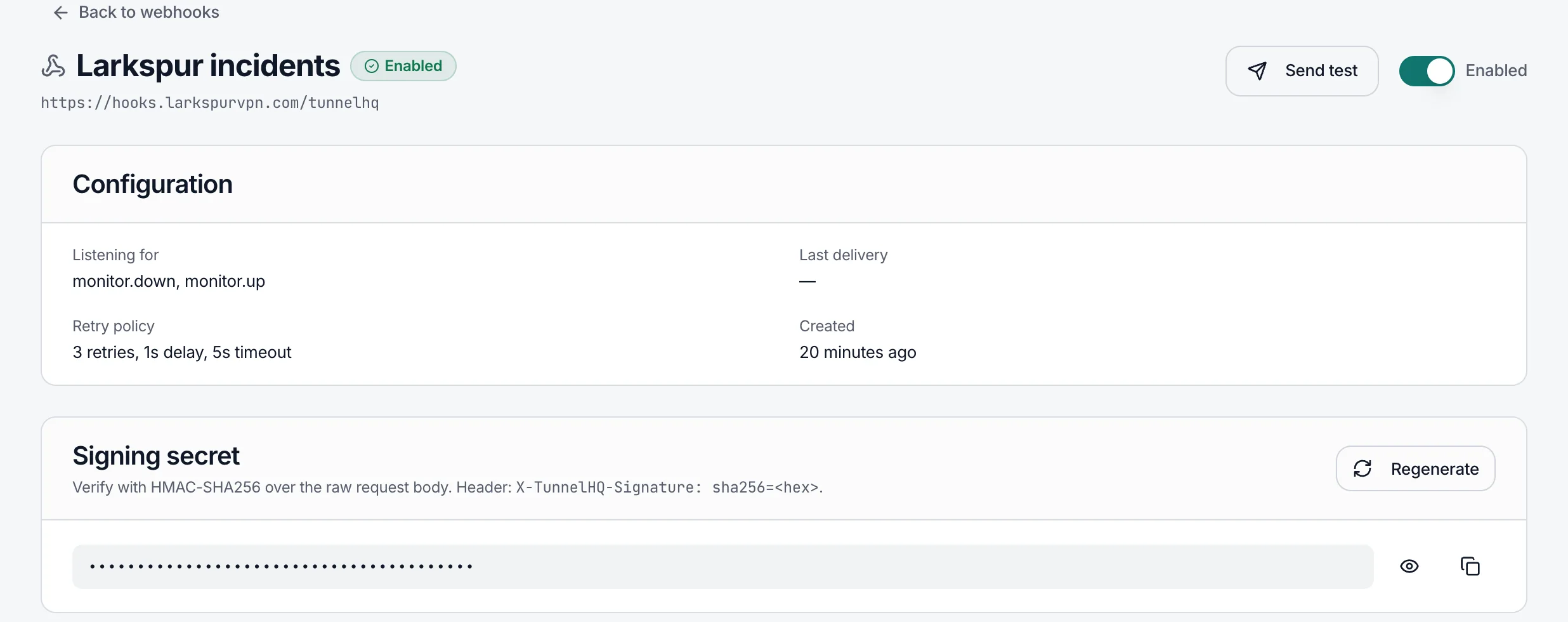
Signed webhooks
Give an endpoint a secret and every delivery carries an HMAC-SHA256 signature.
Questions
How are my VPN credentials encrypted?
The config file or share link, private keys, usernames and passwords a tunnel connects with are saved together as one value, encrypted with AES-256-GCM and a 256-bit key set in the server's environment. Every save uses a fresh random 12-byte IV, and the authentication tag makes a value that was tampered with fail to open instead of reading wrong.
Who can see or decrypt them?
In the dashboard, Owners, Admins and Managers can open a tunnel's credentials to edit them; a Viewer only sees that they're set. The REST API, the thq CLI and AI assistants never get stored credentials back. The app decrypts them only to run a check and to show them to someone who can edit the tunnel. No admin screen shows them.
Where do my configs go?
Configs you paste into AI import are sent to Google's Gemini API to read them; everything else you give TunnelHQ goes only to our own checker servers. AI import is the Analyze with AI button on Bulk import's Paste tab, and it sends the whole pasted text, keys and passwords included. Uploading files and adding a single tunnel don't use it. The free config tester stores nothing you paste: each test writes one line (protocol, host, your IP address and your remaining rate limit) to server logs that are overwritten as they fill.
Where do checks run from?
By default from the general pool: whichever of our checker servers is free. On Pro and up you can test a tunnel from countries you pick, and each country runs its own check; the country picker and the public GET /api/v1/regions list the countries available right now. Your config never leaves our checkers. We don't publish a list of checker IP addresses. Checks and webhooks can't be aimed at private or internal networks: those addresses are refused when you save them and again when they connect.
Should I give TunnelHQ its own peer or login?
Yes. Create a WireGuard peer, or a VPN user, just for monitoring. If it ever leaks, you revoke that one and nobody else is affected.
How are secrets on Uptime checks stored?
Request headers, a request body and a basic-auth password on a website or API check are stored as you enter them, not encrypted the way VPN credentials are. Only people who can edit checks see them; a Viewer sees that they're set. A heartbeat's address is treated the same way.
How is my sign-in protected?
By default you sign in with a 6-digit code we email you. It works once, for 10 minutes, and five wrong tries end it. We keep only a keyed hash of each code, never the code itself, and an address with no account sees the same page, so it can't be used to check who has one. Passwords are hashed with bcrypt at work factor 12. A password needs at least 8 characters with a letter and a number, and the most-leaked passwords are refused. Two-factor sign-in works with any authenticator app, and turning it on or off asks for your password. Settings → Security lists your active sessions and signs out all the others; changing or resetting your password does that too. Sign-in attempts are limited per IP address and per account.
How do API keys work?
API keys come with Starter and up. Every request's key is checked against a bcrypt hash, and too many wrong keys from one address are slowed down. Keys made in the dashboard start with thk_ and a random prefix. A key belongs to the workspace it was made in and acts with its creator's role, so a Viewer's key can only read; finer scopes don't exist yet. Give a key 30 days, 90 days, a year or no expiry, disable it, or revoke it; Owners and Admins can revoke any key in their workspace. A copy encrypted with AES-256-GCM lets you copy a key again from the dashboard.
What can a connected AI assistant do?
It signs in with OAuth 2.1 and PKCE, and on the consent page you choose one project or all of them, and read only or read and write. Its codes and tokens are random, shown once, and kept on our side only as SHA-256 hashes. Access tokens last an hour; a refresh token works once, and if one is used twice the whole connection ends. A connection ends after 90 days without use, or as soon as you revoke it under Developers → AI assistants. Through our hosted server an assistant can add and edit, but isn't offered tools that delete monitors or revoke keys. We receive only the actions it asks for, never your conversation; anything you paste into the assistant goes to its provider first. What we store for each connection.
How do I know a webhook came from TunnelHQ?
Give the endpoint a secret. Every delivery then carries X-TunnelHQ-Signature, an HMAC-SHA256 of the body keyed with your secret. Secrets inside webhook addresses are masked in the dashboard. Verifying deliveries.
Do you keep a record of security changes?
Yes. We keep an append-only record of who created, disabled or revoked an API key or an AI connection, and who deleted a tunnel, check, project or workspace, with the time, and for AI connections the IP address. It isn't shown in the dashboard.
Who else handles my data?
Hetzner hosts our servers and their backups. An email delivery provider sends sign-in, invitation and alert emails. Stripe takes payments on its own checkout page, so card numbers never reach us. PostHog's EU cloud (Frankfurt) runs analytics. Google's Gemini API reads configs only when you use AI import. Cloudflare serves this website, not the app. Privacy policy.
How long do you keep data, and how do I delete it?
Check results and daily summaries are kept for a year, two on Business; VPN test logs and API usage for a year, and finer-grained records much sooner; your plan sets how far back you can look. Backups are encrypted and taken nightly: database backups are kept for 14 days, a weekly copy of test logs for 28 days, and a change log for point-in-time recovery for 7 days. Deleting a tunnel deletes its credentials at once. To delete your account, email [email protected] and it's done within 30 days. Retention details.
How do I report a vulnerability?
Email [email protected] with steps to reproduce it. We aim to reply within 72 hours and to fix high and critical issues within 14 days. Please keep it private until the fix is out. There's no paid bug bounty.